
// Website under construction //
Welcome to the home page of Christian Molter’s personal project, “Papybara Application Manager.” This project is non-commercial and not monetized. It’s free to use for anyone who values clarity, organization, security, and more when managing their job applications.
Who do I think the Papybara Application Manager is useful for?
- You’re finding that the search for a new position is taking longer.
- The number of your applications is steadily increasing.
- You’re searching across various platforms and channels.
- You’re in the midst of an extended continuing education program.
- etc.
As it happens, I’ve just come out of an extended continuing education program followed by months of unemployment. This isn’t a shortcoming—it can happen to anyone for whatever reason. During this time, managing my active and inactive job applications became increasingly confusing and inefficient. My journey in managing job applications:
- Email/Calendar/Spreadsheet
- Database using Notion
- Python-based application manager
- Windows application manager
Professionally and mentally, I’m rooted in corporate data protection (with a focus on TOM) and information security. This knowledge and way of thinking have been incorporated into the Papybara Application Manager in many ways. Excerpt:
- No cloud. No user account anywhere. No apps or data stored with third parties. The data and documents you enter are always stored only locally on your computer. Backup exception: the first backup can be on the same computer or an external USB drive/hard drive; the optional second backup can be in the cloud, for example—in both cases, encryption occurs automatically. !Warning! I recommend a password manager from the EU/Germany/Switzerland, such as Heylogin or Proton. In its July 2026 issue, c’t magazine featured five password managers from the EU. Store your password and QR recovery code in a password manager so that you can quickly resume working on another computer in the event of a fire, theft, etc.
- Data, backups, and documents (e.g., resume.PDF) are encrypted using AES-256, along with a random 256-bit master key.
- Password (according to BSI ORP.4) and/or QR code for login.
- The Application Manager does not send anything externally on its own. Only you activate functions, and only you trigger actions. By default, all external actions (e.g., the “Check Updates” program at papybara.de) or third-party actions (e.g., local email programs via `mailto:` or Google services) are disabled and must be enabled individually by you if you wish to use them. The Papybara Application Manager can also be used entirely without any externally directed communication or communication with third parties that requires individual activation.
- The use of AI chats (LLM) is essentially delegated to the user; prompts are provided. Google services only work after the client ID and secret have been entered and saved with Google. Both are disabled by default and become active only after the user has successfully enabled them.
- The integration of Google services is a separate issue, and I generally do not use it for information with a confidentiality level of >= or higher. I recommend integrating Google services only to users who know what they’re doing and have—or are willing to acquire—the technical knowledge required. Login is handled via OAuth 2.0 with loopback (127.0.0.1) and PKCE (S256), plus a random state value. Permissions are minimal: calendar events for appointments/deadlines, read-only access to Gmail (to automatically process rejections in the application manager), and the ability to create Gmail drafts with selectable attachments.
The Papybara Application Manager comes with extensive help documentation—support may be provided through a community in the future, if necessary.
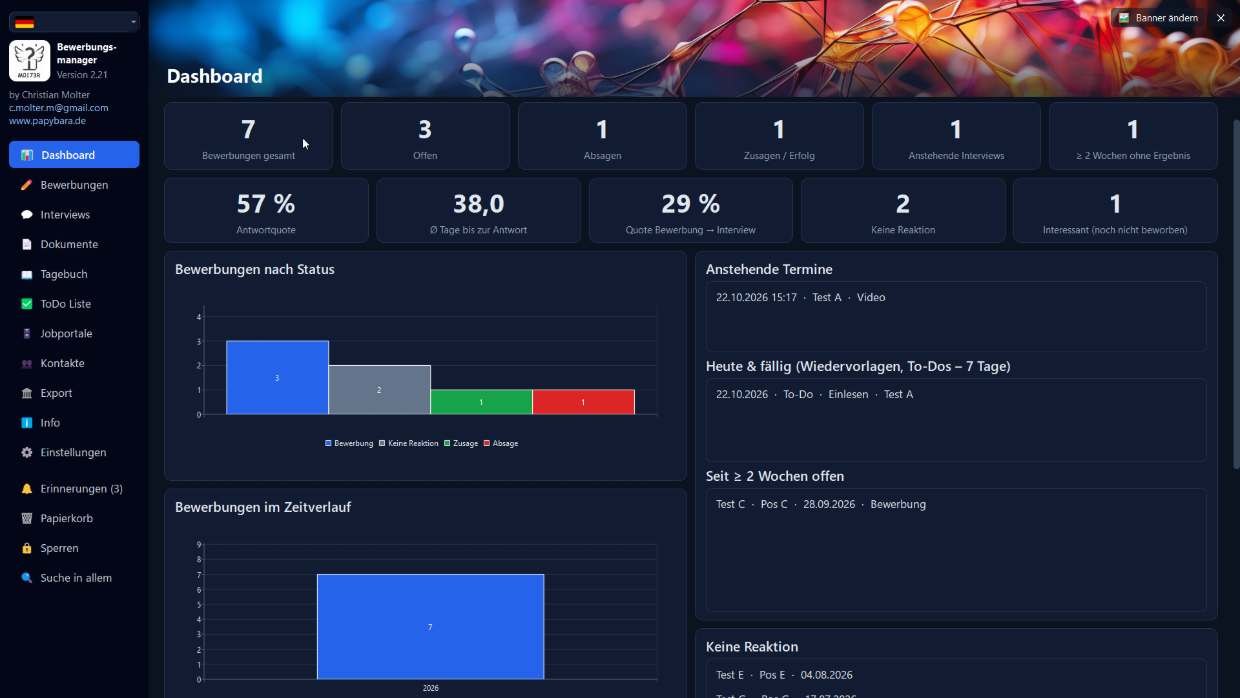
If there’s something in the Application Manager that could be improved, or if you’re missing certain features, etc., you can easily submit your feedback via the “Info / Send Feedback” option in the Application Manager. Please realistically prioritize your requests and suggestions based on how important they are to you:
- ASAP
- High
- Medium
- Low, Nice to have
Alternatively, you can submit it anonymously as a feature request here online on the right-hand side without providing your email address.
I usually review requests promptly, consider whether and when I’d like to add them to the backlog or implement them, and check if they’re already in the backlog. Please note: This is not a promise to implement every request—or even just one! I review and decide for myself. Reminder: This is a private project; the Papybara Application Manager is currently provided free of charge.
When a newer version is released, you can simply install it using the (optional automatic) update feature within the program or download it from papybara.de. Your data is located in a different directory, separate from the program directory.
Good luck with your applications!
Christian Molter